


Apple WWDC 2025 Keynote: Meet the New iOS

Apple Intelligence
To start, Apple Intelligence is getting boosts across popular apps and amongst features that users already enjoy, like Siri. Writing Tools, Genmoji, Image Playground, Clean Up and Visual Intelligence are all getting upgrades thanks to Apple Intelligence. A slew of features including email summaries, ChatGPT integration, and new Private Cloud Compute will enhance your user experience; with Private Cloud Compute, your privacy is extended into the cloud, so no one can access your data-not even Apple. Siri will also be getting a host of new languages it can understand, including Portuguese and Vietnamese.
And now, Apple is unveiling a huge new feature for developers: with the Foundation Models framework, you can have any app access the on-device Large Language Model at the core of Apple Intelligence to unlock new, intelligent experiences in your most-used apps. Because Foundation Models taps into the on-device network, you can access it even when you're offline (while still maintaining your privacy).
Liquid Glass
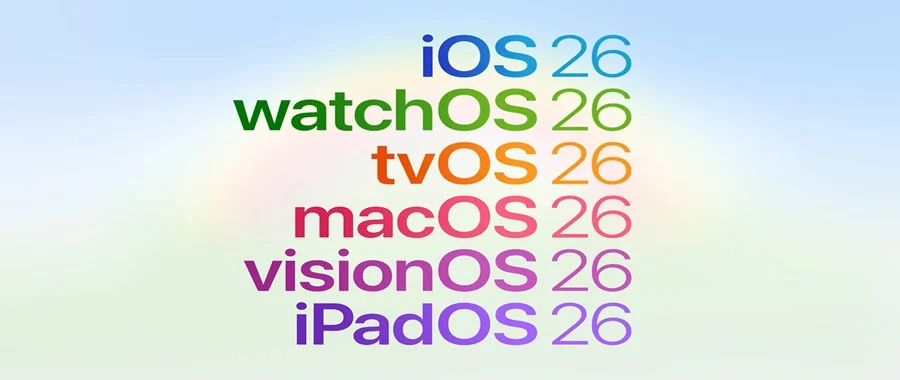
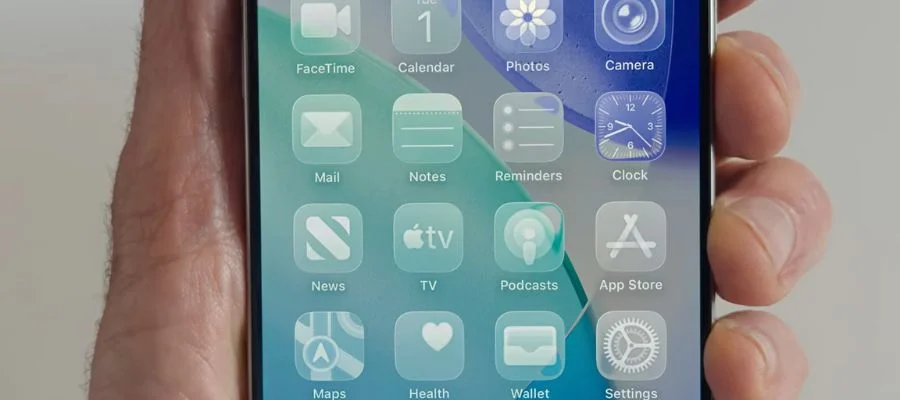
There's also a major redesign of the operation system, the first since iOS 7. Apple has created their most ambitious design update yet, with a universal design across all platforms including MacBook, iPhone and Apple Watch inspired by their VisionOS virtual reality experience. Liquid Glass is the foundation of this redesign, mimicking the clarity of glass as its name implies. It dynamically reacts to movement and lets you enjoy every experience more, from watching Apple TV+ shows to texting. On-screen elements are also redesigned for harmony between software and hardware, with rounded edges that better mimic the product in your hand. On-screen elements will shrink when you scroll down, and expand when you scroll back up. It's all better looking, more intuitive and more enjoyable. There's light mode, dark mode, different tints and, most excitingly, an all-new clear look. And as predicted, Apple announced the change to its update names, with the next round of OS updates corresponding to the year 2026. First up is iOS 26.
WWDC 2025: Meet iOS 26
iOS 26 offers meaningful improvements and a new design including refreshed app icons. The Lock Screen and Home Screen are getting updated. The Lock Screen controls are now made of Liquid Glass. Swiping up to the home screen is newly more responsive, also mimicking the glass look. On the lock screen, wallpapers are more dynamic; the size of the time and its font, for example, can adapt to the image you have onscreen. Moreover, the image on your lock screen actually dynamically moves when you get notifications, keeping the central aspect of the image at the forefront; it can even produce a 3D effect. And when you're listening to music, there's all-new animation that displays on the lock screen.
Camera App
With iOS 26, the Camera gets a more intuitive and streamlined design. Now, there will be two capture options on display: Photo and Video. With a swipe to the left or right, you can access additional capture modes like Portrait. Swipe up to access all settings like flash and aspect ratio. All other options, like switching to 4K capture, are available with a tap. To accompany it, the Photos app gets an update. Toggle between the Library and Collections to easily find a photo.
CarPlay
The iOS 26 update also revamps CarPlay. Their new Liquid Glass design extends into your car, along with new icons that look good in Light and Dark mode. The new design makes calls more compact on screen, so you can still see your GPS screen easily. New widgets deliver important information in convenient snippets to keep your eyes on the road. All of these updates are all coming to CarPlay Ultra, the newest iteration of this feature that brings your display to every screen in your car and new vehicle controls for features like your car's radio and climate controls. Apple is collaborating with different auto makers to bring CarPlay Ultra to a variety of models.
Phone App
With iOS 26, the Phone app has a new unified layout option to keep your favorites front and center while still keeping your recent calls and voicemails on display in one convenient list. With Apple Intelligence, you'll get new voicemail summaries. The contacts and keypad remain at the bottom for a revamped yet familiar feel. There's also a new Call Screening feature, ideal for the ever-present scam calls. With it, your phone will actually screen who is calling and why, then display that information so you can decide if it's a call you actually want. And if you're put on hold, new Hold Assist keeps your spot in line while you wait for a live agent. The Phone app can actually detect hold music and automatically silence it; once the music stops and an agent comes to the phone, your iPhone will notify you.
Messages App
Backgrounds are coming to Messages; there are presets to choose from, or you can choose your own image. Group chats also get an awesome new update with Polls; great when you're planning a group outing. You can also request, send and receive Apple Cash from the group chat. Group chats will also now get typing indicators. Additionally, Unknown Senders are getting their own separate area, so you can keep track of your important conversations more easily.
Emoji & Image Playground
Apple Intelligence is also making emojis better, for more personal communication. You can combine emojis to form your own custom characters. You can also leverage ChatGPT to make custom contact photos with Image Playground.
Translation Features
Have you ever experienced a language barrier? iOS 26 introduces Live Translation, translating your conversation on the fly. It's available across Messages, FaceTime and Phone. It can automatically translate a text message for you, for example. Maybe your grandparents speak a different language-it's a great way to improve your communication and stay in touch. Or maybe you're trying to plan a destination wedding. No matter what, your iPhone will help you across language barriers.
Apple Music
New features coming to Apple Music include Lyrics Translation and Lyrics Pronunciation. They're also introducing AutoMix, so you can enjoy your music like a DJ, blending one song into the next. You'll also love Music Pins, which lets you place your favorite artist, album or playlist at the top of your library.
Apple Maps
We all have our usual route to work or when running our errands. Now, your iPhone can learn that route and offer it in Maps. If your routine changes, your iPhone can adapt. Maps can also send alternate route options on your typical drive if there are significant slowdowns. And with Visited Places, you can choose for your iPhone to detect when you're at certain locations, and it will save those locations for easy access later or sharing a recommendation with a friend. You can delete them and they're encrypted, so you have total control over your privacy.
Wallet
Apple Wallet makes things easier. Now, you can have your car keys virtually in your Apple Wallet, with partnerships with major auto makers including Audi, Kia, Volvo, Mercedes, BMW and Hyundai. Select states can now securely store your identification in your wallet, and you can also create a digital ID with your passport. While this won't replace your passport, this is a valid form of identification at select TSA checkpoints, making it easier to keep track of your most important possessions while you travel. The Boarding Passes in Wallet are also getting a refreshed look, now including convenient access to airport apps and Find My to track your baggage and shareable flight status. Apple Pay is also getting an update in iOS 26: there are more convenient pay methods coming. You can redeem your points and pay in installments in person, and Wallet will be able to offer order tracking both from Apple Pay and from your email using Apple Intelligence.
Gaming App
Apple is designing a new destination for mobile gaming on iPhone. Meet the Games app. This serves as a hub for all your favorite games, alongside personalized recommendations based on your gaming preferences. There's also a tab for Apple Arcade. In the Library tab, you'll be able to see all the games you've ever downloaded from the App Store. There's also the Play Together tab, which lets you see what your friends are playing. Alongside Challenges, it's easier than ever to enjoy gaming together.
Visual Intelligence
The final update for iOS is the update to Visual intelligence. Walk by a cafe that looks interesting? You can use the iPhone camera to pull up their reviews and user-submitted photos. The great thing is this feature works automatically-see someone wearing a cool jacket or shoes on X? You can use Visual Intelligence to find similar options on Google. All it takes is the push of a button; then, you'll highlight what you want to search for in the image, and you'll get results for where to buy similar items. The updated Apple Intelligence can also understand if you're looking at a social media post about an event you're interested in; use the same easy button push to add the event to your calendar.
watchOS 26
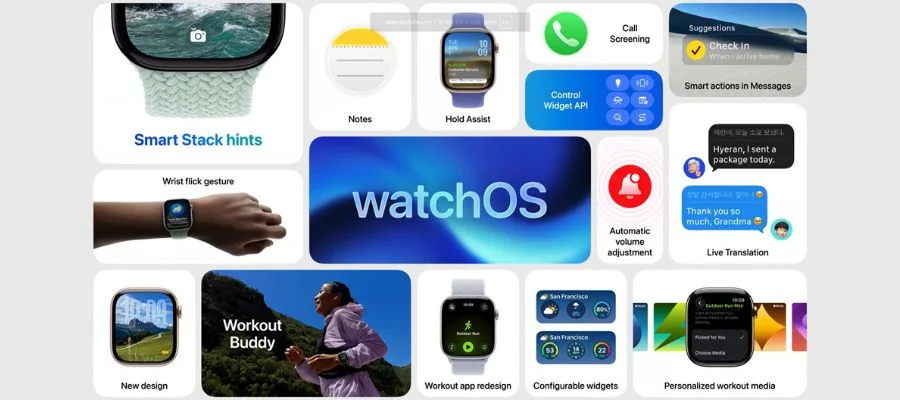
Apple Watch is also getting a stylish and high-tech update with the new WatchOS. Liquid Glass carries over to the popular wearable, to offer a streamlined experience between your Apple devices.
The Workout app is getting an exciting new feature: Workout Buddy. Workout Buddy gathers data from your workout and analyzes your fitness history to identify meaningful health and fitness insights in real time. It can even generate encouraging messaging that's aligned with your current activity and fitness goals. So, for example, it can congratulate you for completing a 5K in record time. Workout Buddy can also mark key moments, like when you've completed another mile on your run. All of these features are a great way to stay motivated and keep track of your workouts without any added effort on your part. Workout is one of the most popular apps on Apple Watch, and the newest OS is designed to make it even easier and enjoyable to use. Popular features like the Custom and Race Route features are a mere tap away, so it's easier than ever to get a great workout.
Smart Stack
Smart Stack is also getting an improvement, optimizing data like location data and recognizing trends in your user data. Maybe you go to the gym at the same time every day: you'll get a Smart Stack notification to your watch when you arrive. With Smart Stack, your Apple Watch can also detect ambient noise levels in your room and adjust notification volume to not be disruptive in quiet places. There's also a new wrist flick feature to mute calls, silence timers, dismiss notifications and more, adding a new gesture to make Apple Watch even easier to use.
Messages App on Apple Watch
With Apple Intelligence, Messages is hugely improved on Apple Watch. There's Live Translation to stay connected with anyone, and backgrounds to add personal flair. You'll also be able to quickly share your location from your watch with Find My. Notes is also coming to Apple Watch, whether you want to jot something down quickly or access your other notes, like those from your iPhone.
Apple TV & tvOS 26
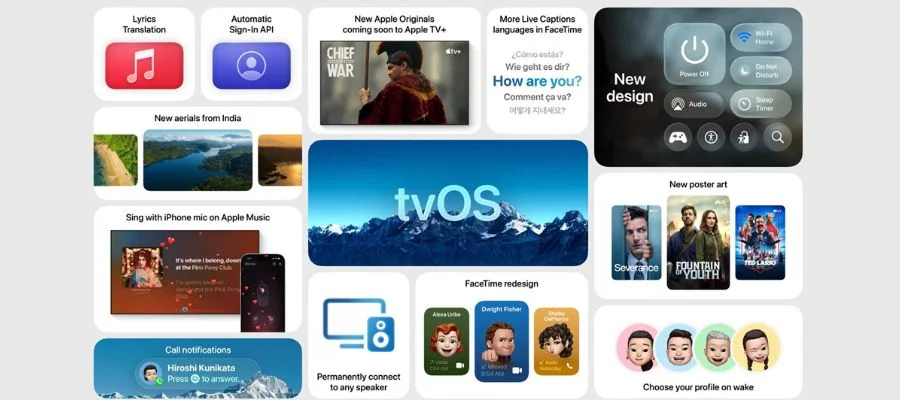
Apple TV is getting an interface update to enhance the viewing experience with tvOS 26 with Liquid Glass. Playback controls refract the content underneath, which means the design is less obtrusive, great if you need to set an alarm or dismiss a notification while you're watching a show on Apple TV+. Different profiles mean it's easier than ever to get back to what you were watching.
Apple TV+
When you're able to update to tvOS 26, the enhanced navigation will make it easier to find your favorites and discover new content. WWDC 2025 also saw the announcement of a new lineup of content to Apple TV+, with new shows and new seasons featuring Maya Rudolph, Denzel Washington, Reese Witherspoon and more. Yes, a new season of The Morning Show is coming. If you have a favorite show on Apple TV+, be sure to check out the full lineup to see what's coming. There will be new releases every week.
Apple Music
With tvOS 26, you can get an enhanced karaoke experience singing along to Apple Music. Now, your iPhone works as the microphone, and your friends can add songs to the queue from their own iPhone.
macOS Tahoe
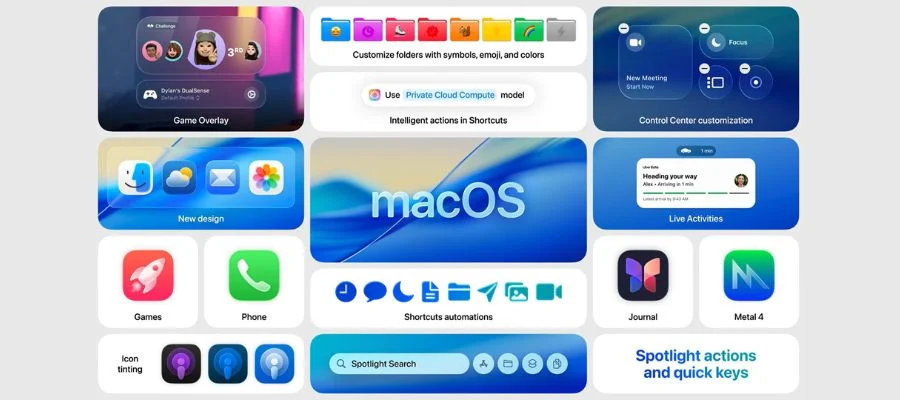
The newest release of macOS offers something for every kind of user. Meet macOS Tahoe, designed to deliver beautiful and powerful tools. It offers a lof of the same features as iOS, with more robust features to take macOS to the next level. Design is elevated, refreshing elements of your computer while still feeling distinctly Mac. The widgets and app icons are refined with Liquid Glass, an upgraded visual experience that carries over when you open the apps. The menu bar is now completely transparent, creating a visually larger display. You can choose which controls appear in the Menu Bar and Control Center, including controls for your favorite apps like Zoom.
There are also new ways to customize your Mac to your needs. Now, you can choose the color of the folders on your desktop, and even add emojis that display on each folder to keep track of work projects, important personal documents and more. Alongside your custom wallpaper, your entire display can be customized for a seamless visual experience.
There are also two new Continuity features coming to macOS Tahoe. Live Activity lets you take action directly from your Mac, even if you started that action on your phone (like ordering food on UberEats). The Phone app is also coming to Mac, synced from iPhone. You can make calls from your Mac, access contacts and recent calls, and more.
Shortcuts
Shortcuts is also getting an update, making it even easier to get more done. By combining features across multiple apps, it's easy to streamline daily activities. Apple Intelligence is powering new intelligent actions, like summarizing text or creating images with Image Playground. There's also a new action that lets you access Intelligence models so you can do things like building a shortcut to compare lecture notes to a recording of that lecture. This is another feature that can be used with Private Cloud Compute, so your workflows and tasks stay private and protected.
Spotlight
Spotlight can help you get more out of your Mac with its biggest update yet. Enjoy intelligent suggestions to search your content, based on what you're doing on your computer. You can search for apps and even use commands for those apps, all from the Spotlight search bar. With Quick Keys, you can add a Reminder, for example, by typing in AR in the bar and adding the reminder. You'll spend less time clicking around, majorly enhancing your productivity.
visionOS
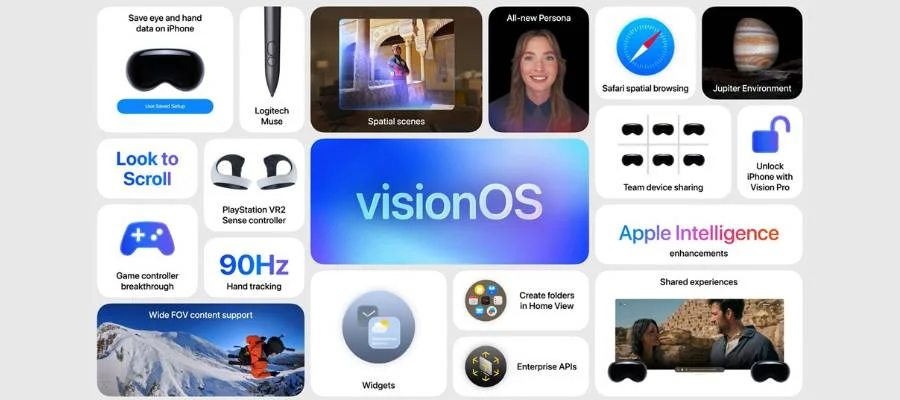
If you invested in an Apple Vision Pro, this update is for you. visionOS 26 gets new spatial features, new features for enterprise, new accessories and new content. One of the new experiences coming to visionOS is Widgets, with a spatial design that seamlessly integrates into your space and stays in that space. Plus, developers can create widgets for their own apps with WidgetKit. Spatial scenes are also coming to visionOS 26, creating more realistic memories by adding multiple perspectives to your 2D photos. Sony is also bringing support for their PlayStation sense controller to Apple Vision Pro for more engaging gameplay.
Personas & Enterprise Features
The Personas feature is getting a dramatic makeover with visionOS 26. Your skin tone, eyelashes and more are replicated more accurately than ever. It also makes it easy to enjoy a virtual game with a friend or access new Enterprise workflows. visionOS 26 also adds the ability for multiple individuals to use the same Apple Vision Pro at the same organization, with the ability to securely save your data and settings to your iPhone; this lets you use the Vision Pro as a guest user with ease. There's also a new Protected Content API, ideal for especially sensitive information like medical records.
iPadOS 26
iPadOS 26 is getting a stunning new design. The lock screen has a new time layout like iOS 26, and integrated Apple Intelligence brings features like Live Translation and more intelligent Shortcuts. You'll see features from iOS like Polls in Messages, the new Phone app, the Games app and more. iPadOS 26 leverages how personal, portable and powerful these devices are, by focusing on improving multitasking, files, and audio and video.
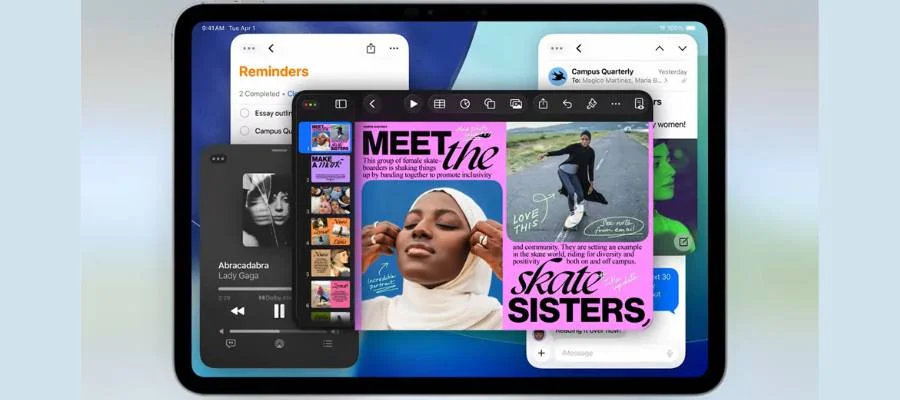
Most excitingly, there's a new windowing system coming to iPad. This system lets you move and rearrange apps to more closely follow the intuitive way many people use iPad. The new grab handle lets you resize apps into windows and you can place them anywhere you want on your screen. So you can watch a video and take notes at the same time, or look at your calendar while you plan a trip. There's also a tiling feature, you can flick windows toward the edges of the screen to tile them. You can even click and hold the window controls to access more tiling options. This is a feature that iPad users have been requesting for a while, so it's exciting to see it come to life with Apple's signature beautiful design. There's also a menu bar coming with iPadOS 26.
The Newest from Apple
What can you take away from the Apple WWDC 2025 keynote? There are big software changes coming to every Apple device. We're excited to see the brand listening to common user requests including translation, polls and the updated iPad interface. While WWDC is mainly aimed at developers, there are announcements that we can all be excited for. With Apple Intelligence, your devices are more powerful than ever. The Apple event this fall will likely reveal the new iPhone and other devices, but if this keynote has you ready to upgrade, be sure to shop our Apple selection online or visit the authorized Apple boutique in our atrium.


