


Apple WWDC 2026 Keynote: All Systems Glow


Cross-Device Design Updates
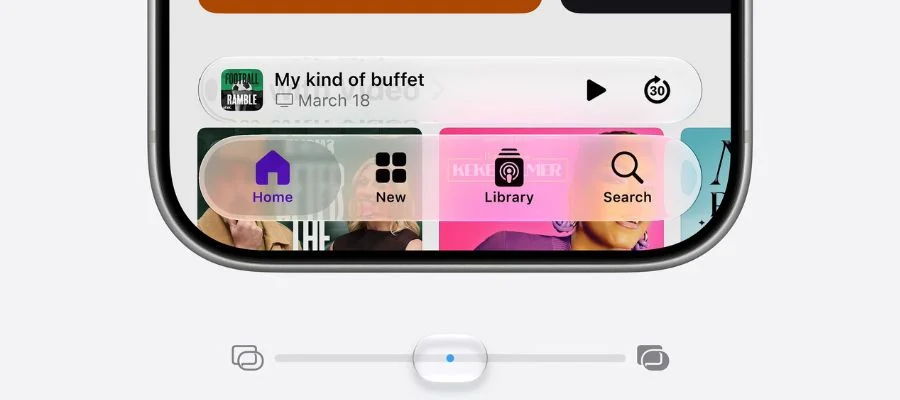
Apple is making cross-device design refinements to Liquid Glass. Now, Liquid Glass more easily shows content beneath it. There's also a new slider in the Settings app to adjust the clarity or opacity of Liquid Glass based on your personal preferences. Additionally, Liquid Glass elements will be added to app icons to make them look better on your iMac, MacBook or iPhone.
Improved Responsiveness Across Devices
Another cross-design improvement is upgraded responsiveness. iPhone and iPad apps will now launch up to 30% faster, even third-party apps. Content will also load faster, like new photos appearing in your library up to 70% faster. AirDrop transfers are up to 80% faster. Even older iPhones as far back as iPhone 11 will be more responsive thanks to the CPU scheduler, which basically means the right task is executed at the proper time. That means iOS 27 will be available to more iPhones than any system update ever. iPhone will also be smarter about knowing when to connect to a nearby Wi-Fi network or use cellular data, like when you're getting off a flight and no longer want to connect to the airline's network. iOS, macOS and iPad OS are also getting an upgrade to the Search function. The new Search system will index the content on your device, making it easier and faster to find what you're looking for, from photos to emails.
New User-Based Updates
The theme this year seems to be actually responding to customer needs. Shared Folders for photos will now support Android and Google phone users. The Health app will now have support for perimenopause. And AirPods will now have support for Custom EQ, so you can adjust audio settings to your personal preference.
Trust and Safety Updates
Apple is expanding their child safety features. Child Account immediately adds safeguards, like blocking adult websites and setting age-based restrictions on the App Store. This year, Apple is building on existing Child Account settings, like what kids can see, who they can talk to and how often they can access certain apps. This year, parents can now add content over time, increasing access as their child grows and learns. Ask To Browse is a new feature that requires kids to get permission from parents before visiting a new website; it's easy to ask them seamlessly in iMessage, with context to help parents decide. And, it's on by default for kids under 13. New Communication Safety warns and blurs potential nudity, and also asks for permission before showing potentially violent images. Additionally, new time allowance recommendations for apps based on their age, developed with child development experts like the American Academy of Pediatrics, helps parents determine how long they can use social media, mobile games and streaming apps. Parents can also adjust the time allowances themselves based on their own child. Screen Time Schedule lets parents adjust which apps can be accessed at different times of the day, which is great for keeping kids focused in school. Screen Time is also getting an update to make it easy for parents to see which apps children are using the most. Apple is also offering a full suite of features for third-party app developers to ensure they're offering age-appropriate app experiences.

More From Apple Intelligence
The next generation of Apple Intelligence is supposed to make your products more useful and more personal. Apple's AI Architecture puts the user at the center. Apple teamed up with Google Gemini so Apple's AI models work on both devices and servers. Apple Intelligence can use Spotlight to find exactly what you need. With App actions, Apple Intelligence pulls from your emails to give you the right tools to help you accomplish more tasks, more easily. There was also an emphasis on privacy with AI usage. Apple Intelligence uses on-device processing and Cloud Compute, ensuring your data isn't stored, and is only used to execute your specific request.
Introducing Siri AI
Let's face it: a new Siri announcement is what most of us have been anticipating. Siri has been rebuilt with powerful AI at the core, with Apple Intelligence. Meet Siri AI. You can still tap into Siri AI with commands you've been using, like "Hey Siri." Now, Siri is a more capable assistant that is also more conversational for more detailed answers. Siri can draw on world knowledge to help give you better information, like when a concert is happening and how you can get tickets to that concert, and can even set a reminder for when tickets go on sale. So while Siri is accessing different apps like it always has, there's a more seamless interaction thanks to its improved capabilities. Can't remember your friend's address? Siri can go back into your messages to give it to you, and can even add their home as a stop on your route. You'll also be able to set the pace and expressivity of Siri's voice. Dictation will also be more precise.
Another new feature? Using the side button on your phone to ask Siri a question and get an in-depth answer. The example Apple gave was asking for the World Cup schedule, then planning a watch party around one of the games. Siri can even include images in these long-form responses. We also love that there are citations for Siri's answers, if you need to dig deeper on an answer or a recipe.
Siri on macOS
Siri AI will also be integrated into Spotlight on your Mac. You can ask Siri about images, files or text on your computer. Siri's responses can be dragged around the screen and resized, so it's helpful while you're mid-task. Siri can also be used to compare files. You can also use Siri to help write an email based on files you're using on your Mac, understanding the information in the files and incorporating necessary information in your message.
Introducing the Siri App
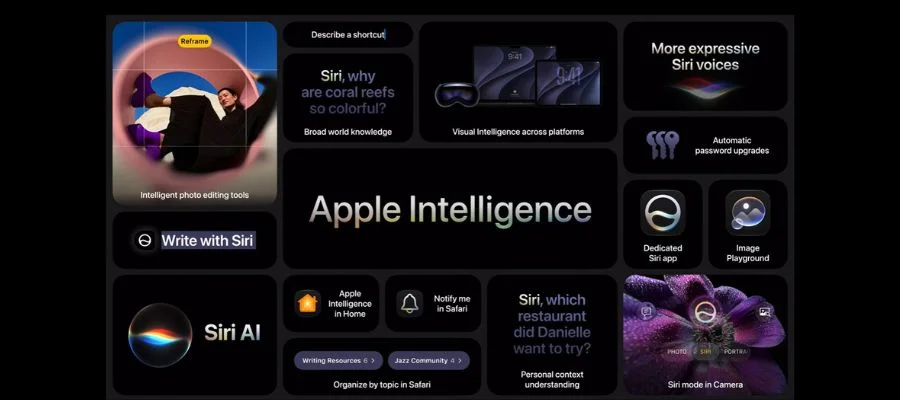
There's also a new dedicated Siri app, with functionalities for iPhone, iPad, Mac and Apple Watch. It's even integrated with visionOS. Visual Intelligence adds Siri to your iPhone camera, for example, to understand images and answer questions about what's in those images. And it's still run on Private Cloud Compute to keep everything private and secure. Or, point your phone's camera at your meal to get nutrition information. On macOS, there's a dedicated keyboard shortcut, after which you can type directly to Siri about what's on-screen. On iPad, Visual Intelligence can be used to ask Siri about what's on-screen. With visionOS, Siri can recognize what you're looking at to answer questions and provide helpful information. You can also write with Siri. Use Siri to generate a draft for a presentation or write an email to a colleague or a friend; Siri can understand the difference between the two. Additionally, Apple Intelligence will now offer automatic proofreading across devices and apps.
Apple Intelligence-Powered Features on Apps
Safari is getting upgraded with Apple Intelligence with a simpler, smarter way to manage tabs. Now, Safari can organize tabs into topics, identifying similarities and grouping those tabs together. It can also add new related tabs based on the topic. When you're done, you can close out your tabs or save the topic as a tab group. With Notify Me, you can tell Safari what you're looking for and get notified when that information becomes available, like registration opening. A huge announcement is the new ability for Safari to create a custom extension based on what you're looking for.
On Passwords, Apple Intelligence can be used to take action on your behalf, like updating compromised passwords for you. On Messages, Apple Intelligence can understand the context of your conversation and offer suggestions, like opening the Calendar or Notes app. Calendar uses Apple Intelligence to let you add events to your schedule using natural language, like if you're meeting your friend in your contacts for lunch at a specific location. Making a call? Apple Intelligence also upgrades the Phone app, by looking at who you're calling (not what you're saving, for privacy) to surface relevant information like a flight number. On the Home app, Apple Intelligence can group multiple notifications into one seamless, informative notification. Shortcuts is easier than ever to use thanks to Apple Intelligence. Now, you can just describe a shortcut, like letting your spouse know your daily ETA on your way home from work.
Apple Intelligence for Creativity
Apple Intelligence also makes powerful image creation easier in Image Playground. You can create more photorealistic styles and ask for images you want with more natural language, which Apple Intelligence has been improved to better understand. Apple claims this is helpful for small businesses creating flyers or creating an invitation. In the Photos app, Apple Intelligence makes advanced edits possible. The Cleanup tool is getting an upgrade, removing elements more accurately with more realistic in-fill. Or, you can expand images with the Extend tool. And, for the most exciting innovation in Photos, Apple Intelligence powers Spatial Reframing, which, yes, lets you reframe a photo you've already taken. Maybe a sign is sticking up behind your friend's head; you'll be able to see the edits in real time before you click Reframe. You'll be able to toggle between the before and after to ensure you've achieved your desired image. As with all the Apple Intelligence features mentioned above, your photos and information therein is still private thanks to Private Cloud Compute. Some of the new Apple Intelligence features will require paid access, which is included in some iCloud+ tiers. Additionally, the most powerful intelligence models will come to the newest iPhones and iPads.
Apple WWDC 2026: Design, Privacy and Apple Intelligence
These three pillars were the main focus of the presentation, rather than individually addressing iOS, macOS or watchOS, marking a big departure from WWDC 2025 and other previous years. Apple continues to value privacy, and the many updates announced today will definitely make our increasingly busy lives a little bit easier. The public betas of the different operating systems are coming in July, with the actual updates coming in the fall. We're excited to see how the new Siri and other Apple Intelligence-powered features actually work in real life.


