
Note: Scheduled delivery services are available to most of the contiguous United States (available in parts of Alaska and Hawaii). Call 800-860-3577 for more information.
Samsung 29 Cu. Ft. Bespoke 4-Door Flex Refrigerator with AI Family Hub+ and AI Vision Inside 36-Inch Wide in White Glass - RF29DB990012AA

Similar Products In Stock (3 items)


which ends 06/16/2026





- Total Capacity (cu. ft.): 28.6
- Refrigerator Capacity (cu. ft.): 17
- Freezer Capacity (cu. ft.): 5.8
- Convertible Compartment Capacity (cu. ft.): 5.8
- Number of Refrigerator Shelves: 4
- Number of Refrigerator Drawers/Crispers: 2
- 28.6 Cu. Ft. Total Capacity
- Full Depth
- Beverage Center
- AI Family Hub+
- Dual Auto Ice Maker
- UV Deodorizer
- Free Shipping on 1000s of Items
- Guaranteed Satisfaction
- Life Long Customer Service

Meet the Samsung RF29DB990012 Refrigerator
Keep your groceries fresh and easy to find with the Samsung RF29DB990012 refrigerator. The top compartment features two crisper drawers and six door bins, freeing up essential shelf space. A convenient Beverage Center is located on one of the double doors that lead into this compartment. This center offers quick access to your favorite drinks and includes a built-in water dispenser and auto-filling pitcher. Meanwhile, each of the bottom two compartments has three door bins and one drawer, helping you keep everything neat and organized. To reduce unwanted odors, particles and bacteria, the Samsung RF29DB990012 refrigerator is equipped with a UV Deodorizer, promoting fresher, long-lasting storage for all your go-to foods.
Kitchen Convenience Powered By AI
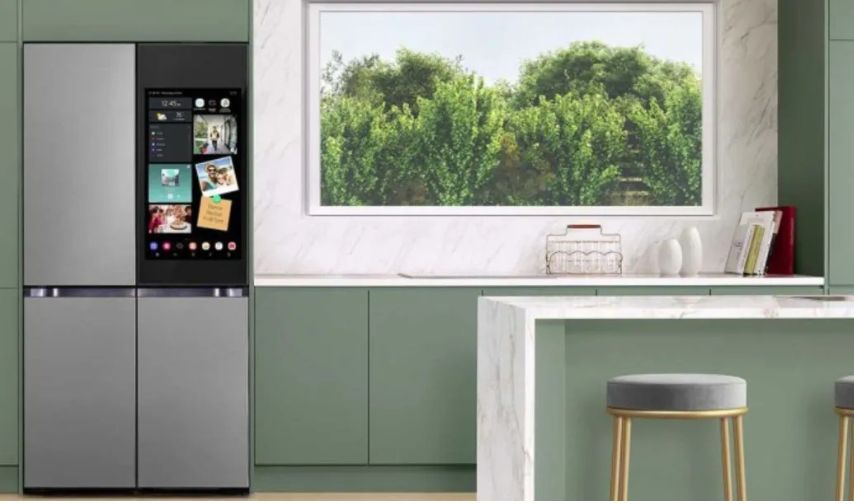
Expand the functionality of your kitchen with the Samsung RF29DB990012 refrigerator. A 32-inch AI Family Hub+™ touchscreen is built into the front panel of this model. This display lets you seamlessly switch from streaming music to researching recipes for meal inspiration. Plus, keep household members in the loop by displaying the family calendar, leaving handwritten notes or sharing iconic photos throughout the day. With AI Vision, conveniently see what's in each compartment without opening any of the four doors. However, the innovation for this Samsung model. The built-in SmartThings Hub opens the door to a completely connected home. Manage your smart appliances, use voice commands with Alexa, adjust your thermostat and check your Ring camera, all from the Samsung RF29DB990012 refrigerator.
Accessible Food Storage
The Samsung RF29DB990012 refrigerator updates the look of your kitchen, adding a modern touch due to the unique four-door design. Unlike other four-door models, this Samsung appliance separates the bottom two zones, giving you more flexibility for food storage. One of these compartments is a FlexZone. Adjust the temperature as needed to create the ideal environment for a variety of items, like meats, produce, beverages or frozen goods. Easily change this zone from week to week to match the meal plan or upcoming occasions. Contact our experts at 800-860-3577 to learn more about the Samsung RF29DB990012 refrigerator or continue your own research with our detailed refrigerator sizing and buying guide.
Features
- AI Family Hub+™
AI Family Hub™+features a 32" screen* for an enhanced user experience. It utilizes AI for image recognition and recipe recommendations. Family Hub™+ keeps you connected to your family and home. Share pictures, stream music and videos, access recipes, control your smart devices and Alexa all from the fridge.- *Refrigerator smart video screen
- **Wi-Fi connection and Samsung account required.
- Smart Home
The Family Hub™ connects your appliances and smart devices with the built-in SmartThings Hub. Use voice control with Alexa, adjust your Nest thermostat, get appliance notifications, and see, hear and talk to visitors at the frontdoor with Ring.* SmartThings Energy* lets you monitor yourenergy consumption, set usage goals and alerts when you reach your monthly bill target.- *A Wi-Fi connection and Samsung account required. Compatible with select Ring, Arlo, Amazon, and Nest products, as well as select appliances.
- Entertainment
Stream your favorite music apps, and mirror content from your compatible Samsung Smart TV or simply tap your Galaxy phone to the Family Hub™ for seamless content sharing. Get access to free live TV with Samsung TV Plus, with picture-inpicture, and all your latest updates on Facebook and YouTube.*- *Content services may vary by region and are subject to change without notifications.
- Family
Share pictures and videos with Google photos*, and leave handwritten notes. Keep track and sync family calendars all from the fridge.*- *A Wi-Fi connection and Samsung account required. Google and Google Photos are trademarks of Google LLC.
- Cooking
See what's inside your fridge from your phone, or just swipe or tap the screen. AI Vision Inside* keeps track of what food goes in and out of your fridge and recommends recipes based on what you have on hand. SmartThings Food helps you meal plan, add items to your Shopping List, find community recipes from other users and preheat your oven.**- As of March 2024, AI Vision Inside can recognize 33 food items like fresh fruits and veggies. Recognizable food items will be regularly added and updated. If the food is covered by hand and not recognizable, it may be listed as an unknown item, but the user can always revise the item title through the Family Hub or SmartThings. ** SmartThings App available on Android and iOS devices. A Wi-Fi connection and Samsung account required.
Family Hub 9.0
- Alexa Built-In
Stream your favorite music.*- *A Wi-Fi connection required. Samsung and Spotify accounts required.
- Spotify
Stream your favorite music.*- *A Wi-Fi connection required. Samsung and Spotify accounts required.
- Ring
See, hear, and speak to who's at your front door directly from your refrigerator.*- *A Wi-Fi connection and Samsung account required. Compatible with select Ring products.
- Youtube
Access your YouTube account from a dedicated app right from your fridge.*- *A Wi-Fi connection required. Samsung and YouTube accounts required.
- Whiteboard
Write notes and draw pictures on the Family Hub™ screen.*- *A Wi-Fi connection required. Samsung and YouTube accounts required.
- View Inside
View inside your fridge from anywhere via your smartphone. Or when home, just swipe or double tap on the screen to see inside without opening the door.*- *A Wi-Fi connection and Samsung account required.
- Samsung TV Plus
Tune into free live TV with just your Wi-Fi connection. From popular shows and movies to local news and world sports –Samsung TV Plus, with picture-in-picture, gives you instant access to live streaming content with over 190 channels and growing.*- *Content services may vary by regions and are subject to change without notifications.
- Calendar
View and sync your family's calendars and events.*- *A Wi-Fi connection and Samsung account required.
- Smart Recipes
Get instant access to recipes, photos and videos, including ratings and reviews.*- *A Wi-Fi connection and Samsung account required.
- SmartThings Hub
SmartThings technology is built into the Family Hub™ allowing you to connect compatible Wi-Fi devices.*- *A Wi-Fi and Samsung account required
- Art Gallery
Art Gallery (Atelier), enables you to make the fridge a real piece of art with over 200 paintings in a wide range of styles from classical to contemporary.*- * Each piece of artwork can be shown from 2 minutes to 2 hours, based on the user's preference.
- Google Photos
Share family pictures, videos and drawings with Google Photos. Simply add them to the Gallery app and share to your screen.*- *Google and Google Photos are trademarks of Google LLC. A Wi-Fi connection and Amazon account required.
- Amazon Essentials
Easily find and reorder your favorite items via the Amazon Your Essentials app or widget on the Family Hub™ or Family Hub™+ screen for fast delivery.*- *A Wi-Fi connection and an Amazon account required.
- Picture in Picture
Samsung TV Plus provides free access to over 190 channels. The picture-in-picture feature allows users to keep watching content while you multitask and navigate from screen to screen. - Cooking Communities
Find "Community" recipes from other users and save your favorites.*- *Available on Android and iOS devices as part of the SmartThings App. A Wi-Fi connection and a Samsung account required.

General
Dispenser
Electrical Specifications
Wi-Fi
Approximate Dimensions
Warranty Information
Approximate Weight
Guides


Articles


Rebates
-
 Samsung Receive Additional 1 Year WarrantySamsung Receive Additional 1 Year WarrantySamsung - Purchase an eligible Samsung appliance and extend the original 1 year warranty at no additional cost.Expires 07-08-2026
 -
 Samsung Buy More Save More $100 to $1,000Samsung Buy More Save More $100 to $1,000Samsung - $100 to $1,000 Promotion.Expires 07-08-2026
 View Rebate
Frequently Asked Questions
-
The AI Vision Inside uses a smart camera to scan, recognize, and categorize up to 33 types of food items inside the refrigerator. It continuously monitors food freshness and sends alerts before items expire. This helps you stay updated on inventory, reducing food waste and unnecessary grocery purchases.
-
The refrigerator includes the AI Family Hub+ with a 32-inch touchscreen and acts as a SmartThings Hub. It supports voice control with Alexa, connects with compatible Ring, Arlo, Amazon, and Nest devices, allows appliance notifications, and lets you monitor energy consumption and set usage goals.
-
The Dual Auto Ice Maker produces two types of ice: cubed ice and Ice Bites. This allows users to choose the style of ice best suited for their needs, whether for chilling drinks or other uses.
-
The Beverage Center includes an internal water dispenser and a built-in AutoFill Water Pitcher that automatically refills itself. The pitcher can also infuse flavors to your water (optional accessory), providing convenient access to fresh, chilled drinks.
-
Yes, with the AI Vision Inside and SmartThings app, you can see inside your refrigerator remotely on your smartphone. You can also view the interior from the fridge's touchscreen without opening the door, helping to save energy.




Guides


